AlignFactory Desktop aligns documents to save time when feeding a computer-assisted translation tool, neural machine translation engine or bilingual concordancer.
Available licences
AlignFactory Desktop is available for various subscription periods, with technical support and updates included.
AlignFactory Desktop aligns documents to save time when feeding a computer-assisted translation tool, neural machine translation engine or bilingual concordancer.
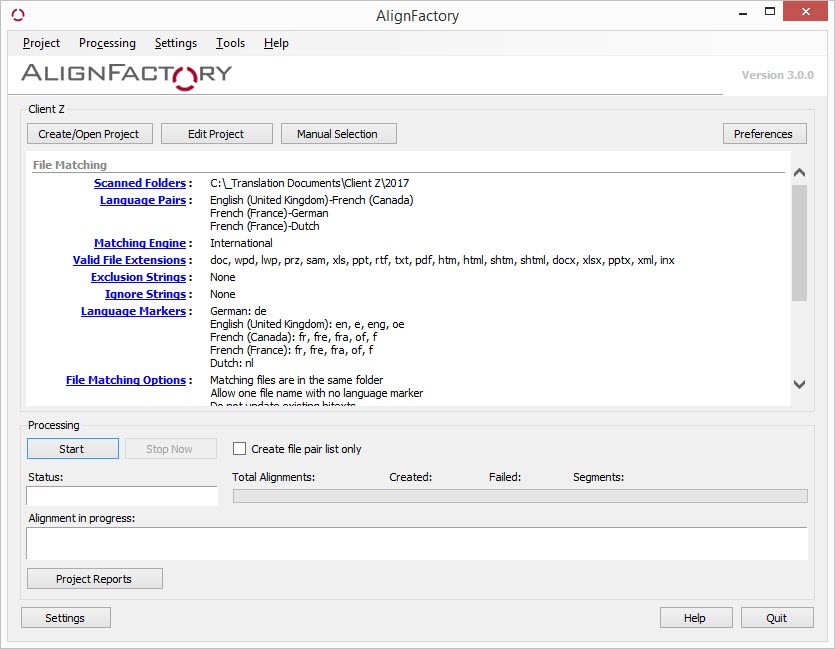
AlignFactory offers two distinct methods for pairing source and target documents: by user-defined language markers in the file names or by language detection and electronic fingerprinting algorithms that analyze the file type and content. When a valid file pair is detected, AlignFactory performs the alignment and creates a bitext in the chosen format.
Matching parameters
AlignFactory has many configuration options that let you help the software correctly identify file pairs for alignment, even if they have different file name structures. File matching criteria include:
Language markers
Filtering by file extension
Exclusion strings for removing files with names containing certain character strings
Ignore strings for ignoring certain character strings in file names
Ignore characters after last marker option
Match files in different folders option
Allow one file name with no language marker option
LogiTerm bitexts
AlignFactory peut créer des bitextes LogiTerm au format XML ou HTML. Si vous disposez de LogiTerm, we recommend creating XML bitexts, as they are more visually appealing and do not display segment language codes when viewed in a web browser. What’s more, XML bitexts contain source document metadata and are slightly faster to index than HTML bitexts. In addition, the segment language codes are not visible when viewing bitexts in a web browser.
HTML bitexts, however, can be opened in any application with no display issues. They can also be easily indexed by any full-text search engine.
TMX files
You can also create TMX files to import into any translation memory. The file creation options are as follows:
Create one TMX file for each pair, or merge into a single file
Insert source document name into each segment
Automatically add attributes (project, client, domain, etc.) to segments
Alignment editor
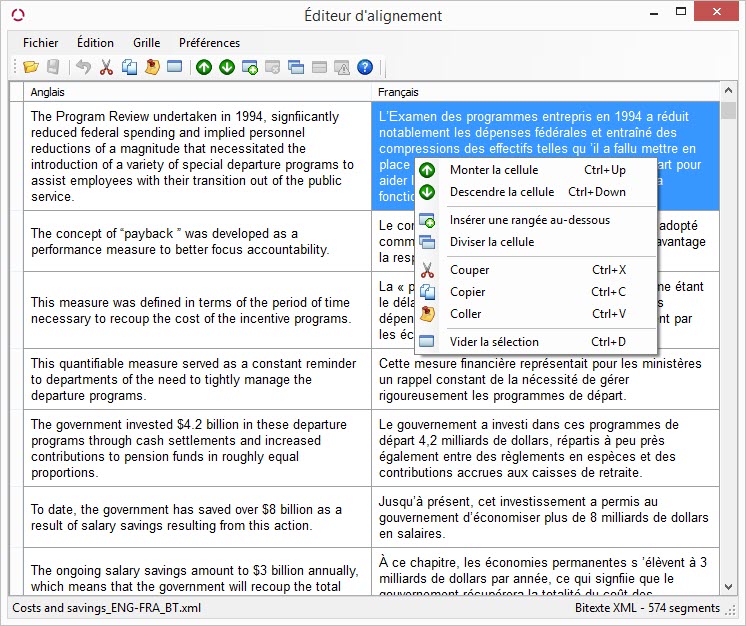
AlignFactory includes an alignment editor that lets you modify or correct LogiTerm bitexts and view and edit TMX files before importing them into your translation memory software.
Segment filtering
Over 18 filtering options let you delete unwanted segments in your alignments automatically. Primary filters are as follows:
Reject if both sides are the same
Reject if segment contains no letters
Reject duplicate segments
Reject if too few words in segment
Reject if one side is significantly longer
Reject if too many sentences in segment
Web Crawler
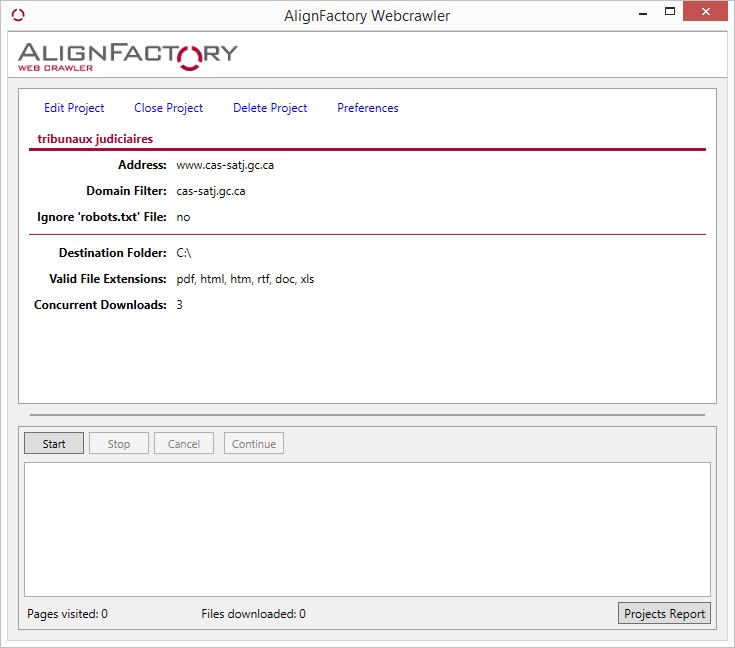
The Web Crawler tool lets you automatically download pages or files from a website. Once the download is complete, simply create and launch an alignment project to automatically align all the downloaded content. Then, import the alignments into a computer-aided translation tool.
The Web Crawler contains the following domain filters:
Ignore top-level domain (TLD)
Allow two-letter domain
Do not truncate URL prefix
You can also filter downloaded files by extension or file name character string.